IT

BigPond ADSL ? Your ADSL Service Cancellation Notice email

BigPond ADSL ? Your ADSL Service Cancellation Notice email

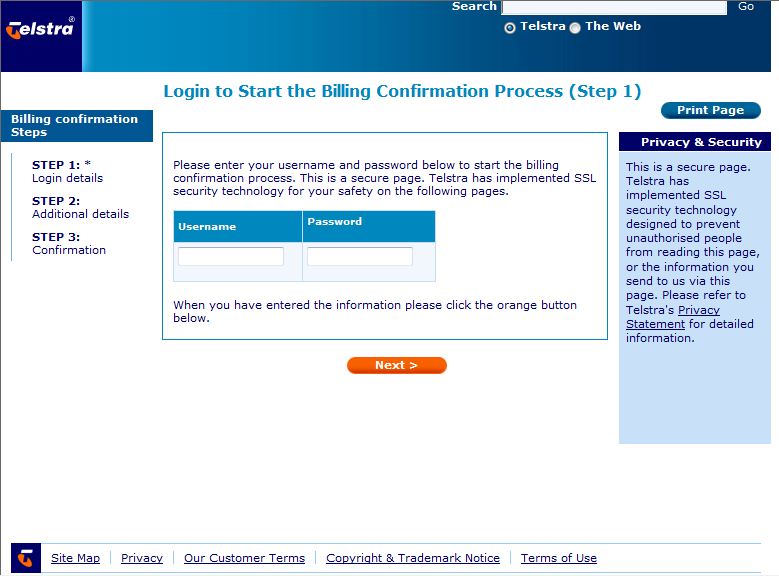
Disturbing email doing the rounds over the long Easter weekend in Australia, pretending to be from BigPond. I?m blogging about this in the hope that you?ll find this entry?if you receive that email and Google it first.? It?s a scam, and a very clever one.

First the details: sender address?ebilling@bt.com?(that?s your first alarm bell-bt.com is not a bigpond or telstra domain name)

Subject: Your ADSL Service Cancellation Notice?(second alarm bell ? I am not and have never been a BigPond ADSL customer)

Issues with security update patch for IE7 WinXP KB2416400?

Our friends at the Kaseya NOC have decided not to rollout out a Microsoft security patch just released for Internet Explorere 7 machines (on Windows XP).� They�ve seen some issues once it�s been installed and there are a few blog sites with people reporting problems.� Suggest hold off installing this one for a while until it�s sorted:

�Post: We have noticed that after applying the patch KB2416400 (MS10-090), when browsing a particular site, all links stop working following clicking a link to open a java script pop-up window. Hitting F-5 to reload the page restores functionality of the links. So to avoid this miss-functionality we have denied this patch from all Virtual Manage machines.

Attention!!!! All your personal files were encrypted with a strong algorythm RSA-1024 �

.. and you can�t get an access to them without making of what we need!

Read �How to decrypt� txt-file on your desktop for details

Just do it as fast as you can!

Remember: Don�t try to tell someone about this message if you want to get your files back! Just do all we told.

*Eeek*� If your computer�s desktop has suddenly turned very pale and is displaying the above message, I hope you have a good backup*.

Protect your PC Against Adobe PDF Reader Security Flaws

Not an original blog entry this time, but advice definately worth sharing from the security experts at AVG � thanks Lloyd!

Melbourne and Amsterdam, 13 August 2010�� It should go without saying that the best way to deal with malware is, of course, not to get infected in the first place.

Lloyd Borrett, Security Evangelist�for�AVG (AU/NZ)�says, �Being aware of what products are being targeted by the bad guys may help you as well, so it may be useful to know that at the moment Adobe products are virtually the number one target across the world with millions of PCs being hit by infected Adobe PDFs. Others are being pwned via Adobe Flash ads via Facebook and other social media web sites.�

Technology considerations for your new startup business

If you�re thinking about starting a business (congratulations!!), then technology might be the very last consideration on your mind.� With a long list of tasks in front of you (like getting a logo and stationery designed, finding an office, and working out your marketing plan), you may just requisition your home computer to start running your new business.��Let�s�look at some of your very first technology decisions.

New computer or your home PC?�� For a while, your home computer may be adequate to handle the necessities of your business.� However, if your computer time is conflicting with the children�s need to surf the internet for their homework, it may be time to consider a dedicated business computer.� Study any system specifications carefully and check the manufacturer�s websites.� Many �cheap� retail deals are superseded models, cannot be upgraded easily or may not connect to a bigger computer network, which will all be important as you grow.� Also, talk to your accountant about any tax benefits that may be gained from leasing instead of purchasing your IT assets.

Paypal / Western Union money scam

Thanks to Kate Booby at Spinefex (www.spinefex.com.au) for alerting us to this one!

�I thought I should bring your attention to a scam that we have 3 separate cases of occur within our immediate friends/family.

All of these people had advertised to sell items (2 x cars, 1 x horse) and had been contacted by email and phone calls from a buyer.

The buyer has asked to pay for the items through paypal (and the sellers had to set up paypal accounts) because the buyer is overseas or can�t use their internet banking (one case the man said he was on an oil rig, another was overseas).� Paypal is generally a safe & secure way to receive funds or pay for items.

Planning the survival of your business

If your technology stopped working, would your business stop functioning too? Is your business totally reliant on the information stored on your computer systems or could you continue to deliver 95% of your products and services and catch up on the computer work later? No matter which end of this scale your business is at, you will fare much better during a major technology outage if you plan in advance, before it happens. This month we take some of the mystery out of Business Continuity Planning.

Office 2010 � great new features!

Written for the Computer Troubleshooters franchise for distribution to our global client base:

Microsoft�s release of Office 2010 has been somewhat overshadowed by the recent Apple iPad release, however the new version of Office has some fantastic improvements that are worth shouting about. This month, we highlight a few of the features that will make your life easier.

Work better together�� Do you e-mail files for people to review, managing revision numbers and tracking editing changes? Or do you use technology like Google Apps for internet-based sharing and collaboration? With Office 2010, your document can now be shared easily on the internet and edited by multiple people at the same time (for real-time co-authoring). This feature alone may change how teams work together internally and how businesses work with their customers.

The 5 things YOU must know about your business�s computers

If someone else is responsible for the technology in your business, it can feel fantastic that you don’t have to worry about that part of your business operation.  But whether that person is an employee, a freelance computer guy or a larger I.T. support company, the responsibility for this part of your business still ultimately lies with you.  Here’s a list of what all business owners should know about their own computers:1. Administrator passwords – ‘Local administrator accounts’ have full access to make changes to your computers.  If you have a server, there may also be a ‘domain administrator’ account.  Make sure you have a record of these account passwords in a safe place.  If your business provides laptops and mobile phones to your staff, also keep a record of any passwords or PIN numbers that are used to secure these mobile devices (e.g. are prompted for when the device is turned on).  This may seem a bit over the top, but it only takes a disgruntled employee or an issue with your support provider and you can find yourself locked out of your own systems, at the mercy of someone else who knows the passwords when you don’t.  I’ve actually seen I.T. companies refuse to release administrator passwords.  Remember, your information is your property, not theirs.

Found a webpage crashing my Internet Explorer tab � how I got around it!

I have a business information blog website set as my homepage.� Today when I started up Internet Explorer, the page content would start to load, I�d see all of the text, and then the tab would �crash�, stating that the page had caused a problem and it was going to try to reload it.� After a couple of attempts at this, I got:

Website restore error.� Internet Explorer has stopped trying to restore this website. It appears that the website continues to have a problem.

Instead of taking me in a constant reload loop, IE had given up.