Office 365

5 tips for success with modern collaboration tools

I see so many people running to a technology because other people said it was good. That�s how our trusted referral society works, but it�s rarely the tech that solves the problem � it�s how you use it.

Modern collaboration tools are the hot topic right now, whether you prefer Slack or Microsoft Teams.

So I wrote my thoughts on the 5 tips to ensure success with tools like those, and published them on our company website:
Outlook for Mac Read receipt and Gmail calendar and contacts

Aside from the strive to use modern collaboration tools, many people still live in email as their main form of business communication. Microsoft�s �any device� approach means we�re seeing more support for Outlook and other Office apps on the Mac, but there are still some functionality differences.

Here are a couple of features that are missing on the Mac, which have recently been flagged by the Office team as in development or preview:

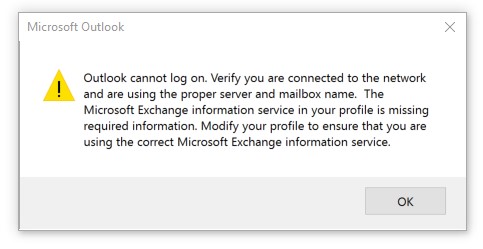
Outlook cannot log on. Verify you are connected to the network.

Outlook cannot log on. Verify you are connected to the network.

I?ve seen this great little error occur with Microsoft Outlook 2016. It?s so great that even completely uninstalling Office 365 ProPlus and reinstalling it doesn?t get rid of the error. This is on Windows 10 with the latest operating system updates applied.

?Outlook cannot log on. Verify you are connected to the network and are using the proper server and mailbox name. The Microsoft Exchange information service in your profile is missing required information. Modify your profile to ensure that you are using the correct Microsoft Exchange information service.?